

.png)
.svg)
.svg)
.svg)
.svg)
Salesforce migrations aren’t one-off events—they recur every few years.
Organizations migrate when they adopt Salesforce for the first time, consolidate multiple orgs after acquisitions, rebuild poorly implemented environments, or roll out major architecture changes such as CPQ, Industries, or new GTM workflows. For most teams, a substantial migration is a recurring part of the Salesforce lifecycle, not a rare project.
Yet the industry still handles these migrations with manual spreadsheets, legacy ETL tools, and GUI-driven mapping utilities. These approaches were designed for simple, one-time data transfers. They break down when teams must reconcile hundreds of objects, maintain referential integrity, and iterate repeatedly while business rules, picklists, and validation logic keep changing. The result is slow iteration, fragile loads, and endless rounds of trial-and-error debugging.
In practice, most Salesforce migrations follow the same loop:
Even with sandbox testing, transformation correctness is only validated after data hits the Salesforce API. There is no way to catch mapping errors, test referential integrity, or verify row counts before load. One iteration might fail 347 records; the next might fail 912. Every cycle requires a full reload and another round of troubleshooting.
Salesforce is excellent at enforcing data quality in production, but during migrations those same controls make bulk data movement slow, fragile, and expensive. What’s needed is a safe environment to evaluate transformations—before a single record touches Salesforce.
Most migrations still rely on Data Loader, TIBCO Scribe, Talend, Jitterbit, or Excel-based transformations. These tools can move data, but they introduce recurring issues:
Transformation logic is buried in GUI workflows, proprietary configurations, or scattered scripts. In smaller migrations, teams often resort to Excel or CSV transformations—which work until complexity grows. When a picklist changes or a lookup breaks, finding the issue means clicking through interfaces or hunting through undocumented logic.
Traditional tools can re-run loads, but not safely. Without carefully configured upsert logic and external IDs, repeated runs risk creating duplicates or missing late-arriving records. During UAT, when users continue adding new data, traditional workflows cannot adapt cleanly.
Salesforce rarely matches the structure of the legacy system. Migrations often require aggregating child records, merging multiple related objects, splitting data into new structures, or reconciling different data grains. GUI-based ETL tools struggle to express these transformations, and making mid-project changes is slow and error-prone.
There is no systematic way to prove that:
Reconciliation becomes a manual spreadsheet exercise, hoping nothing fell through the cracks. This works for simple, one-time transfers—but once complexity rises, the approach becomes a bottleneck.
Do you want to do manual transformations in spreadsheets when you have hundreds of objects? Some of them with joined dependent business logic?

A growing number of Salesforce teams now stage migration data in a cloud data platform such as Snowflake before loading it back into Salesforce. This intermediate layer solves the core problems of safe iteration, transparency, and auditability.
Pull all source data into the warehouse, creating a permanent snapshot. This allows teams to rerun transformations repeatedly without touching the source system.
Instead of a maze of GUI clicks, transformations become SQL or dbt models stored in Git. Every change is reviewable, testable, and reproducible.
Automated dbt tests enforce row counts, referential integrity, uniqueness, required fields, and schema alignment. Pipelines fail fast—errors are fixed in code, not buried in Salesforce load logs.
Mapping source IDs to Salesforce external IDs enables deterministic upserts. Running the pipeline multiple times will not create duplicates, and UAT deltas flow through cleanly.
Every transformation, test, and reconciliation step is logged. When stakeholders ask, “Are you sure everything made it over?”, you provide evidence—not assurances.
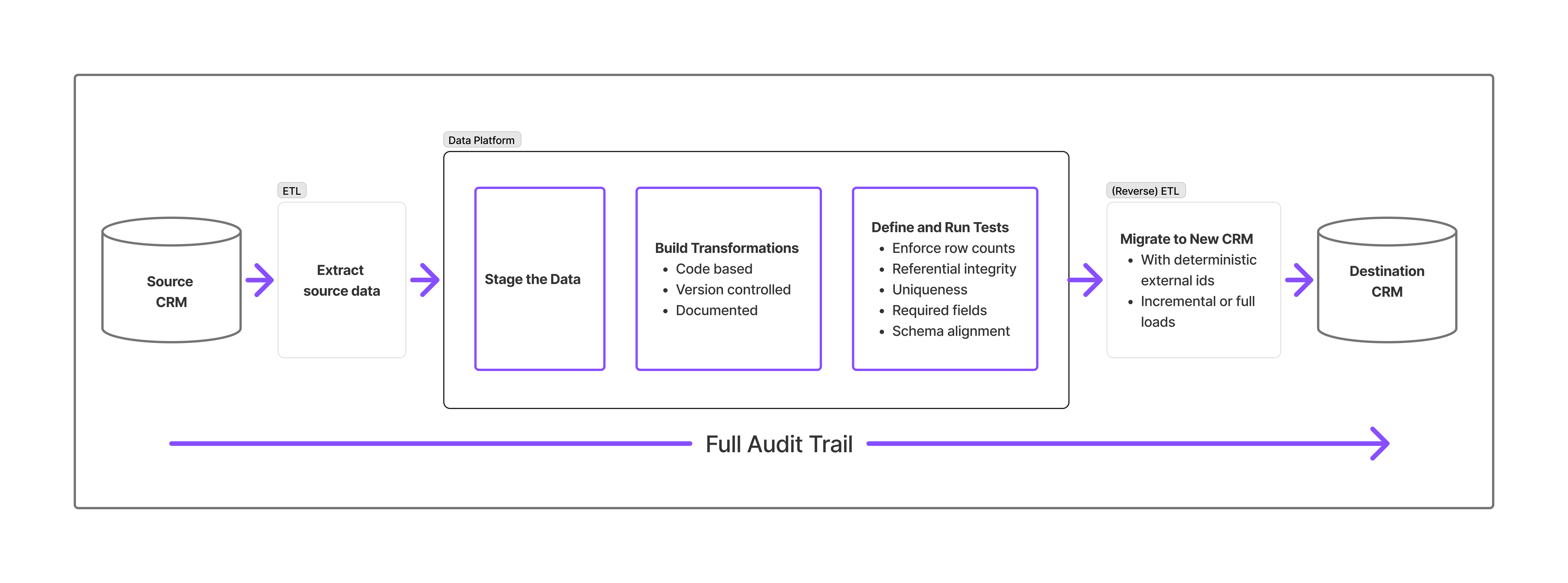
Adding a data platform to the migration workflow does more than reduce risk—it fundamentally improves how Salesforce migrations are delivered. The gains show up in speed, predictability, and long-term maintainability.
Transformations run inside the warehouse, not against the Salesforce API. Pipelines can be rerun freely, without duplicate risk or slow sandbox loads. UAT cycles accelerate because new data is automatically incorporated on each run.
Warehouses handle structural transformations that GUI tools struggle with—joining multiple objects, aggregating child records, splitting or merging entities, or reconciling different data grains. Logic expressed in SQL/dbt is easy to adjust, review, and test.
Idempotent upserts ensure clean updates and inserts on every run. Repeated migrations behave predictably—critical when source systems continue changing during UAT.
Automated dbt tests validate correctness before load. Combined with version-controlled logic and warehouse logs, the migration gains a defensible audit trail for compliance, QA, and executive visibility.
Salesforce architects and admins can focus on configuration, automation, and user experience—not debugging CSV imports or repairing broken relationships. Clean, validated data results in smoother go-lives.
Although the warehouse adds a staging layer, it reduces rework, eliminates manual reconciliation, and shortens timelines. The SQL/dbt logic often becomes reusable infrastructure for future integrations, org mergers, or subsequent phases.
This model strengthens the collaboration between Salesforce teams and data teams:
Designs objects, workflows, automation, validation rules, and the data model.
Bridges business requirements, validates results during UAT, and adjusts configuration based on migration feedback.
Handles extraction, transformation logic, dbt development, reconciliation, test automation, and controlled iteration.
Each party stays in its lane. Together, they deliver migrations that are faster, safer, and more predictable.

Legacy ETL tools move data.
A data-platform approach proves it moved correctly.
Salesforce remains the operational system of record.
Snowflake becomes the controlled environment for transformation and validation.
The result is a migration that is:
For Salesforce experts, this dramatically reduces migration risk—traditionally one of the most stressful phases of any implementation. For clients, it means fewer surprises, faster iteration, and proof—not guesswork—that their data arrived intact.
Dealing with a complex Salesforce migration?
We’re happy to walk through how this approach could work in your scenario—no pitch, just a technical conversation about what makes sense.

Part of the Data Leaders Uncovered series.
Read Post
Featuring Russ Felker, CTO and logistics technology leader
Read Post
Most supply chains generate enormous amounts of operational data, yet very little of it translates into daily decision clarity.
Read Post
Part of our #DataLeadersUncovered series — conversations with data and analytics leaders shaping how organizations use data to drive results.
Read Post
Healthcare has no shortage of data. Electronic health records (EHRs), claims data, insurance premiums, and financial systems generate enormous volumes every day. Yet despite the promise of AI and advanced analytics, healthcare organizations often struggle to turn that data into action.
Read Post
In this installment of Data Leaders Uncovered, we meet Angelika Kenward, Analytics Manager at a global events and media company.
Read Post
In today’s customer-obsessed world, it’s easy to talk about personalization, omnichannel journeys, and “data-driven CRM.”
Read Post
You don’t usually associate spreadsheets and dashboards with justice. But you should.
Read Post
On March 1, 2025, one of our clients received an unwelcome surprise in their inbox.
Read Post
AI is reshaping industries, but the fundamentals of data remain unchanged. In this conversation with Ashish Mohan, we explore why problem definition and statistical thinking still drive meaningful outcomes.
Read Post.png)
The streaming tv platform Tubi was launched in 2014. Its revenue had reached $150 million by 2019, and by 2023 the revenue was $900 million.
Read Post
In our latest installment of the "Data Leaders Uncovered" series, we sat down with Maxwell Dylla, a data scientist with a background in materials science engineering.
Read Post.png)
We’re excited to continue our "Data Leaders Uncovered" series by sharing insights from Prem K. Narasimhan, a seasoned executive in the global life sciences industry. Prem has been at the forefront of addressing some of the most complex challenges in pharmaceutical research, clinical trials, and data management. This conversation shines a spotlight on how innovation and strategic collaboration can drive meaningful change in the industry.
Read Post
Welcome to the second installment of our blog series, "Data Leaders Uncovered." In this series, we delve into insightful conversations with data leaders across industries, exploring their challenges, innovations, and lessons learned in navigating the ever-evolving data landscape. In this post, we continue our discussions by spotlighting Jared, A Director at W.E. Aubuchon Company; a hardware retailer based in New England.. We discussed the intricacies of managing retail data, the transition to modern tools like Snowflake and Power BI, and the opportunities presented by AI-driven solutions.
Read Post
We’re excited to start our new blog series dedicated to conversations with data leaders. Each post will explore their challenges, innovations, and lessons learned in navigating the ever-evolving data landscape. We will be highlighting challenges they have overcome, pain points and the achievements they take the most pride in.
Read Post
CRM systems have long served as the primary hub for customer data. Platforms like Salesforce and HubSpot excel at tracking customer interactions, managing sales pipelines, and providing basic reporting. These functions have made CRMs indispensable for sales and marketing teams seeking a centralized view of customer relationships.
Read Post
In recent years, the concept of fractional professionals has gained significant traction, especially in tech companies. Fractional executives, such as fractional CFOs, CMOs, and RevOps, provide their expertise to organizations on a part-time or project basis, offering a cost-effective and flexible solution for companies that may not require or cannot afford full-time executives in these roles.
Read Post.png)
A Go-To-Market (GTM) organization may find it beneficial to invest in a Data Warehouse (DWH) alongside their Salesforce CRM when they encounter specific indications that their data and analytics requirements have surpassed the analytics and reporting capabilities of Salesforce.
Read Post.png)
Data quality is critical to any data warehouse project. However, it has often been overlooked as businesses focus on immediate value, with increased revenues and decreased costs.
Read Post.jpeg)
In modern data pipelines, continuous data integration and data frequent updates may cause unintended data errors. Blue-green Deployment ensures a final checkpoint for accurate results. In this blog, details are provided on how to implement blue green deployment in a data warehouse project.
Read Post
Companies targeting mobile app publishers can use mobile app data to identify potential customers. This blog discusses using bulk mobile app data for sales outreach.
Read Post.png)
Discover how applied AI can automate tasks and enhance productivity in data analysis. Explore a real life example of Applied AI in report generation.
Read PostStay in the loop with everything you need to know.
%203-svg%20(2).png)

